The Unparallel NewTro VCS Climbing Shoes are an aggressive, downturned performance shoe with a fast Velcro closure for steep terrain, overhangs and technical sequences. You get precision edging, powerful toe engagement and durability, plus a shoe you can whip on and off between attempts.
The downturned last drives power onto the toe, and the 3.5mm RA rubber outsole balances edging precision, friction and durability. A hard midsole supports you on small edges, and an extended toe rand adds toe-hooking grip and longevity. The Zero Closure System uses a Z-shaped Velcro (VCS) strap over an open U-throat, so entry is quick but lockdown is still secure, which is ideal for sessions and repeated attempts. The lined synthetic upper has a suede-like SOLO feel and is vegan-friendly. Choose the NewTro VCS when you want steep-ground performance without fiddling with laces.
Product Details
Colour: Black / Grey / Orange
Gender: Unisex
Age group: Adult
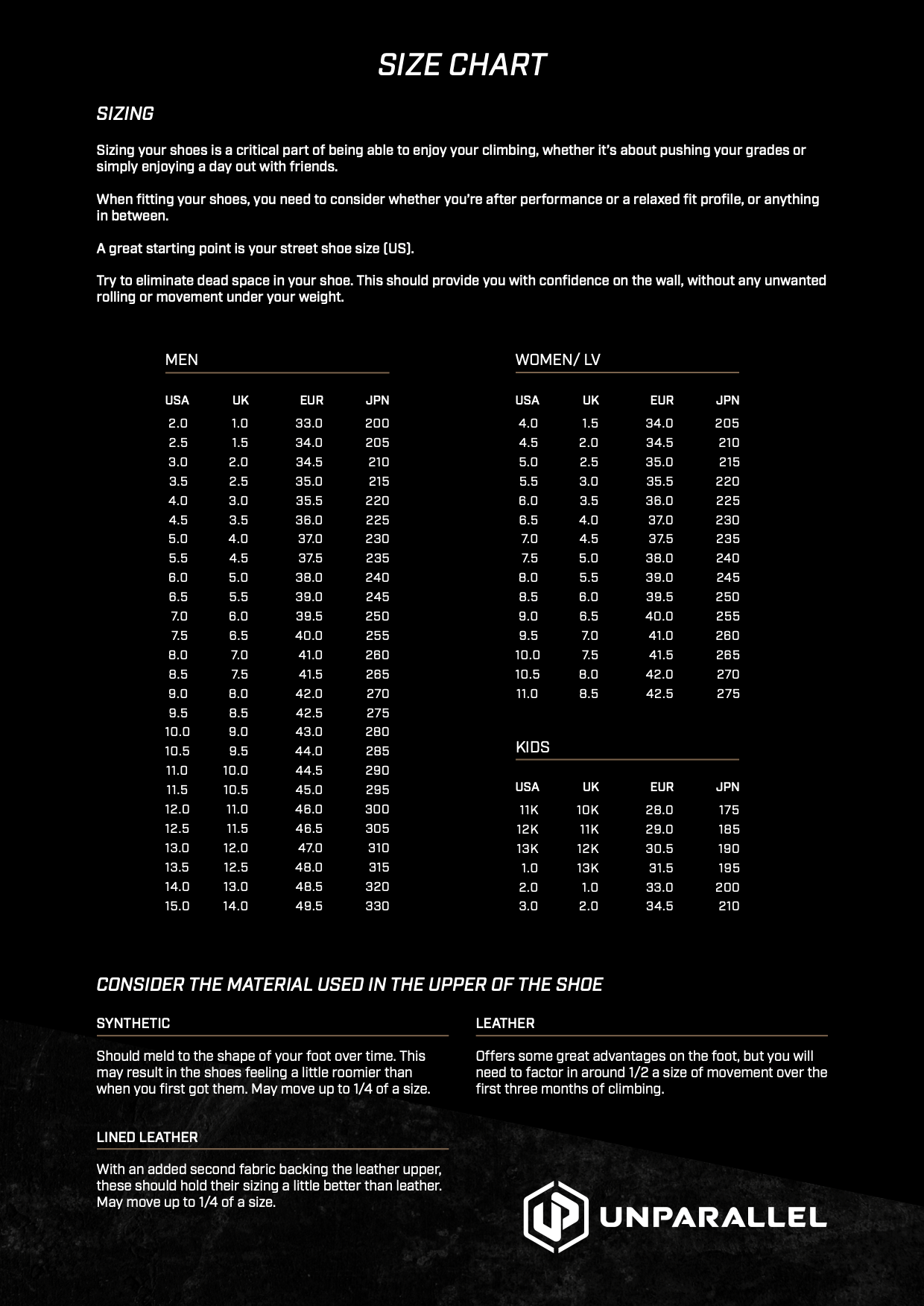
Size system: UK
Sizes in this listing: UK 3–13 (including half sizes where listed)
Upper material: Lined synthetic (SOLO suede feel)
Fit / volume: Aggressive downturn
Why you'll love it
Aggressive downturn – downturned last that focuses power onto the toe for steep and overhanging terrain
3.5mm RA rubber sole – edging precision, friction and durability in balance
Zero Closure System – Z-shaped VCS strap with open U-throat for quick on/off and secure lockdown
Extended toe rand – better toe hooks and added durability
Hard midsole – support on small edges
Good to know
Weight: approximately 431g per pair
Fit: aggressive downturn; unisex, UK sizing from 3 to 13 in this listing (manufacturer quotes UK 4–13)
Upper: lined synthetic with SOLO suede feel, vegan-friendly; closure: Z-shaped VCS strap
Colour: Black / Grey / Orange
Who it's for
Intermediate to advanced climbers on steep sport routes, bouldering and indoor performance climbing who want power and precision with fast entry.
Choosing a selection results in a full page refresh.
Opens in a new window.
PayPal Pay Later Messaging
Step 1: Choose message placement
Click the button below and then hover over your page to select a placement.
Step 2: Paste and save
You have copied the placement for the Product Page.
Go back to the App Embeds section, and in the Paypal Advanced Settings, paste the copied value into the
Product Page field and click the 'Save' button in the top right corner.